Early accessg.studio

The orchestrator splits your request across ten experts

1 prompt, 10 experts

Opus 5.5 · Medium

Example requests

Install on Windows

g.studio runs on 64-bit Windows 10 or 11. You need your own Claude account on the Pro or Max plan, or an Anthropic API key. The wizard checks the other tools and tells you which account each one needs.

g.studio is in beta and free while the beta lasts. You request access with GitHub or your email. Once we approve your account, you download the installer from /cuenta.

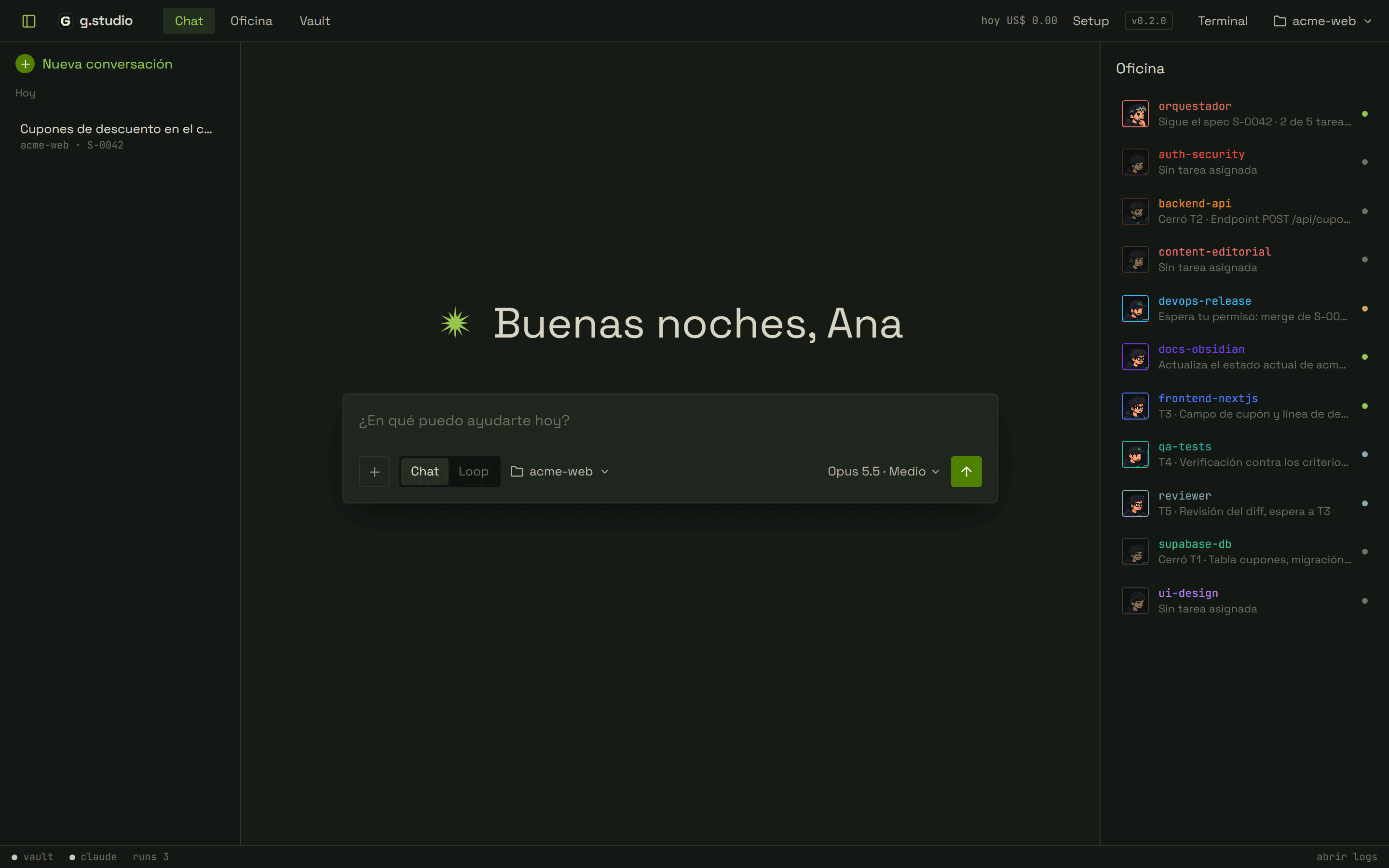
g.studio home screen with a greeting to Ana and the first-request field for acme-web. On the right, the office list with each expert's task.
  1. 01

    Request access with your GitHub account or your email. New accounts go on the waitlist.

  2. 02

    Once we approve your account, /cuenta stops showing the waitlist and enables the download.

  3. 03

    Go to /cuenta and download the installer.

    PS> .\gstudio-setup-<version>.exe
  4. 04

    If Windows SmartScreen blocks the installer, choose “More info” and then “Run anyway”.

  5. 05

    Open g.studio and sign in with the same account. The setup wizard opens the first time.

  6. 06

    Complete the 9 wizard steps: Claude Code, Git, Node.js, GitHub CLI, Vercel CLI, Supabase, Obsidian, Claude in Chrome and Codex. Codex is optional and the other 8 are required. “Install all” lists what is missing, installs it and then runs the sign-ins one at a time.

  7. 07

    Choose the working folder. It has to be a cloned git repository.

    PS> gh repo clone acme/acme-web
  8. 08

    Write your first request. In a new repo, g.studio analyzes the stack and commands, and saves a draft profile in .gstudio\project.json. The orchestrator shows you a summary to correct.

From request to approved spec

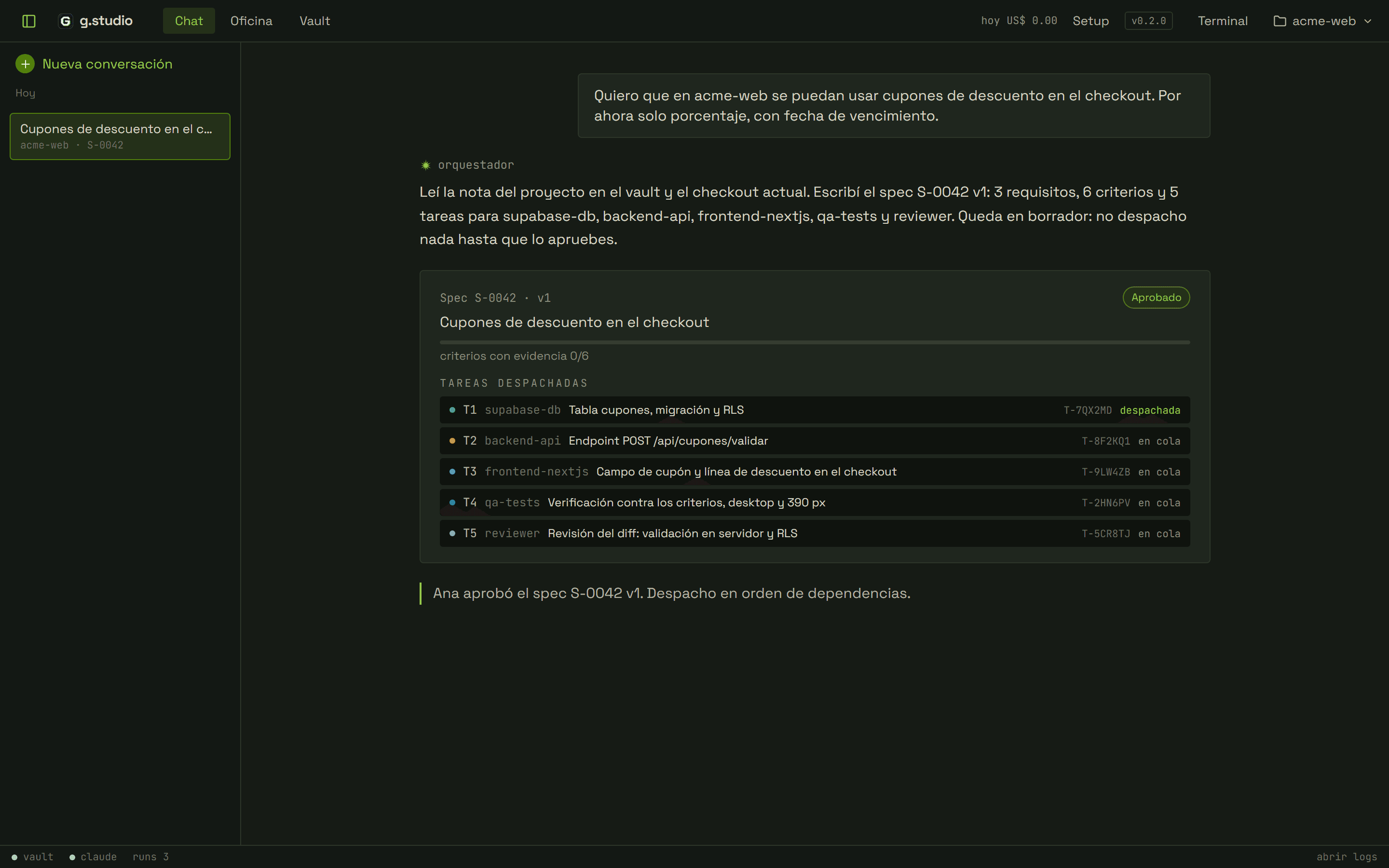
Ana asks for discount coupons in the acme-web checkout. The change touches the database, the API and the UI. The orchestrator reads the project note in Obsidian and the repo. Then it writes spec S-0042 with 3 requirements, 6 verifiable criteria and 5 tasks, each with its role and dependencies. Ana approves v1 and the orchestrator dispatches in order: supabase-db, backend-api and frontend-nextjs.

  • No task is dispatched until you approve the current version of the spec.
  • With “Request changes”, the orchestrator writes the next version.
  • The spec card shows how many criteria have evidence, for example 4/6.
g.studio chat with Ana's coupon request and the orchestrator's reply. Below, spec S-0042 v1 approved, with criteria with evidence 0/6 and tasks T1 to T5 dispatched.

Spec S-0042 · v1 · DRAFT

Discount coupons in the checkout

3 requirements · 6 criteria · 5 tasks (supabase-db, backend-api, frontend-nextjs, qa-tests, reviewer)

▶Requirements and criteria

R1Coupons live in the database and only the server reads them.

R1.1npx supabase db reset applies the cupones migration without errors

R1.2npm test -- tests/db/cupones-rls.test.ts passes: an anonymous user cannot read cupones

R2The checkout validates the coupon on the server.

R2.1npm test -- tests/api/cupones-validar.test.ts passes: expired coupon → 422, valid coupon → 200 with the discount

R2.2npx tsc --noEmit with no errors

R3The buyer sees the discount before paying.

R3.1Chrome smoke test: with coupon ACME10, the total drops 10% and the “Discount” line appears

R3.2Smoke test at 390 px: the coupon field fits without horizontal scroll

▶Task plan

T1supabase-dbCoupons table, migration and RLS

R1.1, R1.2

T2backend-apiEndpoint POST /api/cupones/validar

R2.1, R2.2 · depends on T1

T3frontend-nextjsCoupon field and discount line in the checkout

R3.1, R3.2 · depends on T2

T4qa-testsVerification against the criteria, desktop and 390 px

R1.1, R1.2, R2.1, R2.2, R3.1, R3.2 · depends on T3

T5reviewerDiff review: server-side validation and RLS

R1.2, R2.1 · depends on T3
Ask an expert directly

While backend-api works on T2, Ana wants to know whether the coupons table lets anonymous users read it. She opens the supabase-db desk in the office and writes to it. The expert reads the migration and answers in its console, without editing the repo. If Ana asks for a change, it logs it as its own task and the orchestrator gets notified.

  • Each expert covers one area: database, API, frontend, design, content, tests, review, security, deploy and documentation.
  • If you write to an expert while it works, your instruction takes priority over the task.
  • Direct messages also reach the orchestrator's thread.
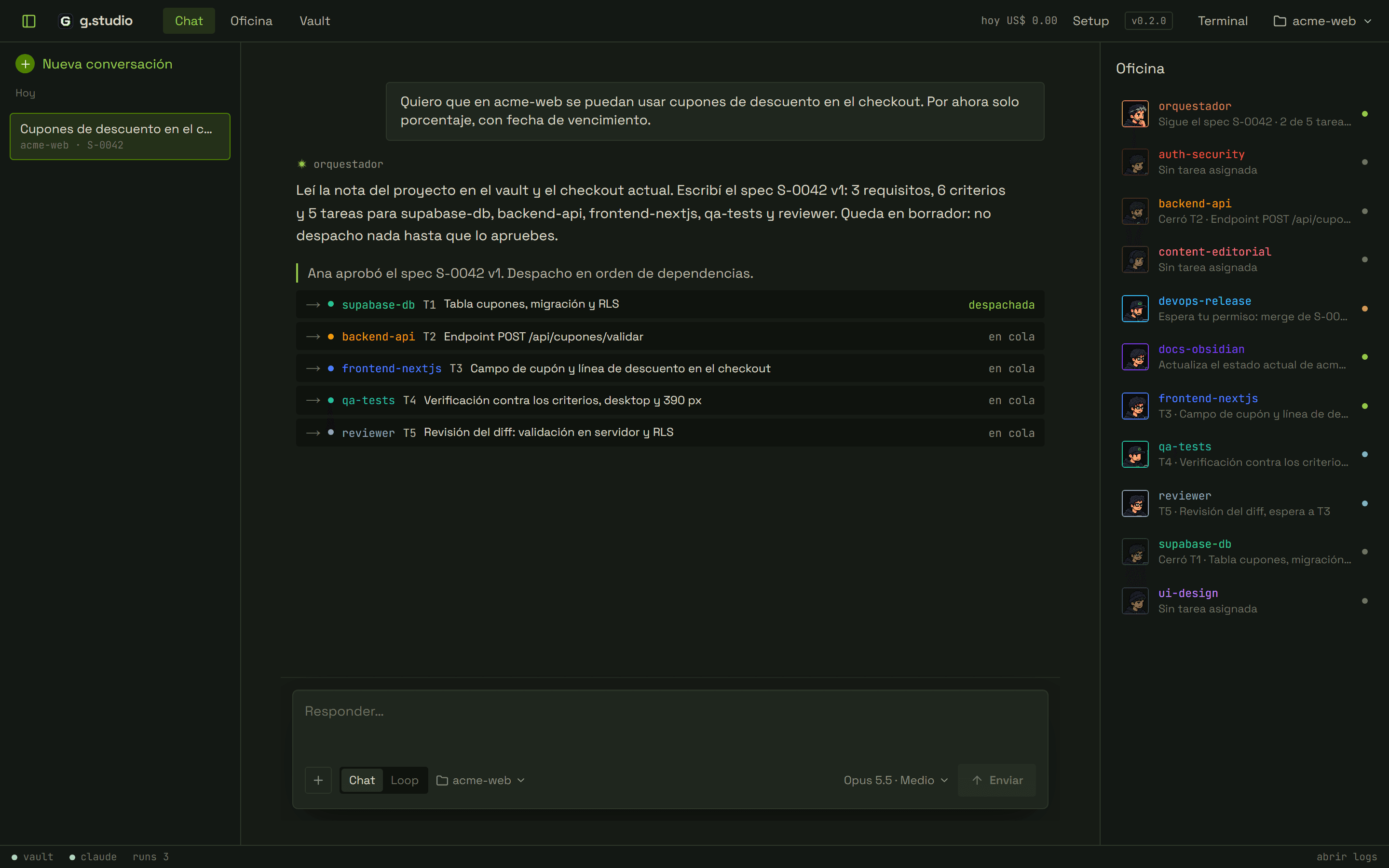
g.studio chat where the orchestrator dispatches T1 to supabase-db and queues T2 to T5. On the right, the office with each expert's task.

I want acme-web to accept discount coupons in the checkout. Percentage only for now, with an expiration date.

Every task has an owner and its own branch

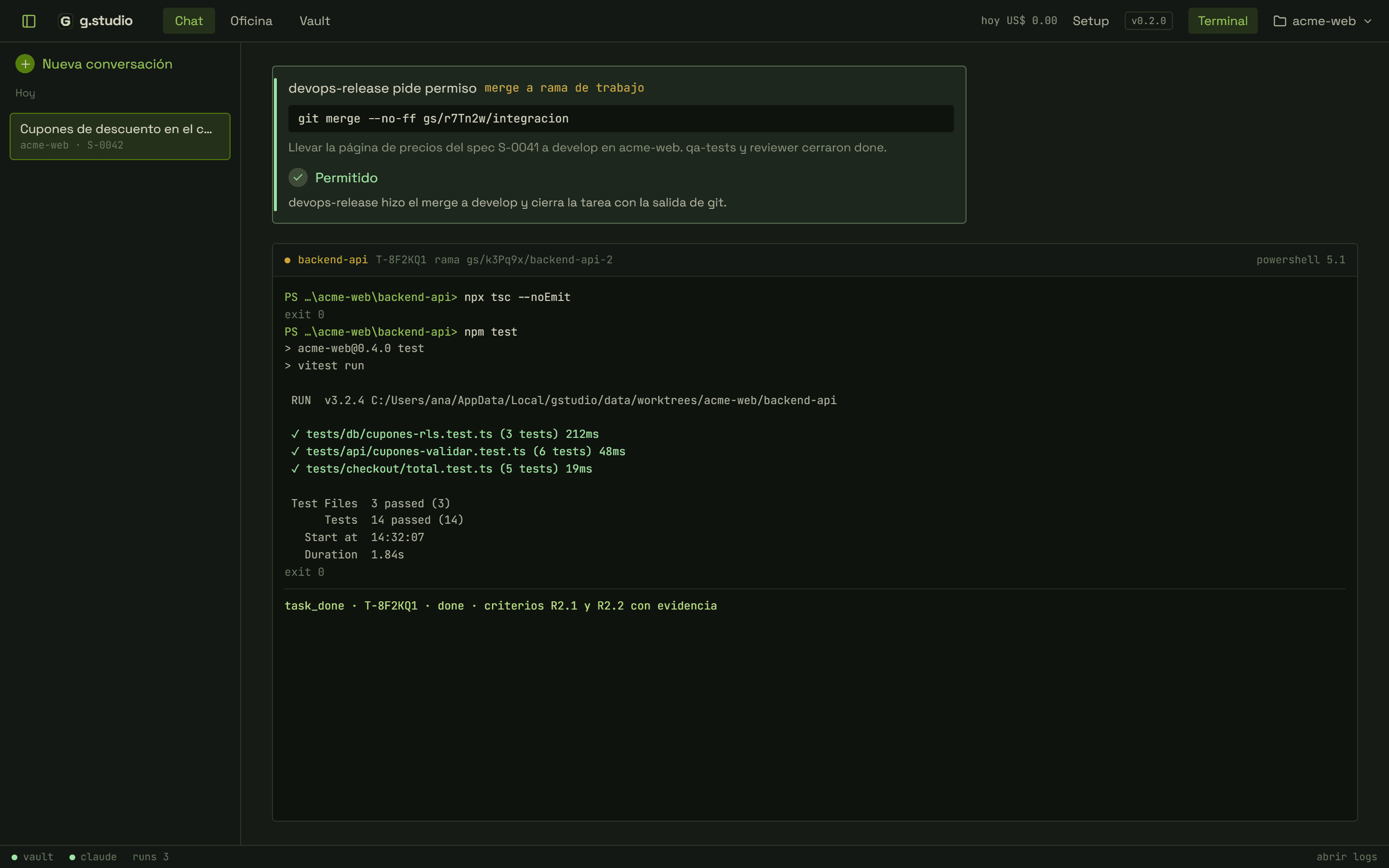
backend-api gets T2, the endpoint that validates coupons. It works in its own worktree, on branch gs/k3Pq9x/backend-api-2. Before closing it runs npx tsc --noEmit and npm test, and attaches the output. g.studio commits the branch and merges it into the integration branch. devops-release merges into Ana's working branch once she approves.

  • Each close-out has a done, partial or blocked status and evidence per criterion.
  • Push, merge to your working branch, deploy and remote migrations ask for your approval.
  • If you deny a permission, the expert logs the pending item and continues with the rest of the task.
devops-release permission for a merge to a working branch, in allowed state. Below, the backend-api terminal with npx tsc --noEmit, npm test with 14 passing tests and the close-out of T-8F2KQ1.

devops-release asks for permission

merge to working branch
git merge --no-ff gs/r7Tn2w/integracion

Bring the pricing page from spec S-0041 into develop in acme-web. qa-tests and reviewer closed done.

backend-apiT-8F2KQ1branch gs/k3Pq9x/backend-api-2
PS …\acme-web\backend-api>

Interactive office demo

The orchestrator and the 10 experts, each with its status and current task. Click a desk or a seat in the room to open that expert's console.

Office

10 experts on the roster

working
2
blocked
1
queued
2
permissions
1
session spend
$0
Room

Desks

How g.studio works

  • 01

    Spec before dispatch

    A non-trivial request produces a spec with requirements, verifiable criteria and a task plan per role. The orchestrator does not dispatch until you approve it.

  • 02

    Approval for push, merge and deploy

    Experts work and commit on their branches without asking. Push, merge to your working branch, deploy and remote migrations wait for your approval.

  • 03

    Context and records in Obsidian

    The orchestrator reads the project context from your vault. g.studio writes a note for each conversation there, the changelog on merge and each spec's note with its evidence.

  • 04

    Loop mode with a definition of done

    In loop mode, the orchestrator checks the goal on every pass and dispatches what is missing or fixes what failed. It stops when the evidence shows the criterion is met.

Where g.studio is heading

What early access includes today and what comes next, ordered by status.

  1. Available

    Early access

    The office with 10 experts, the spec with an approvable plan, the notes in Obsidian and merges with your approval.

  2. Next

    macOS and Linux

    The desktop app on macOS and Linux too, in addition to Windows 10 or 11.

  3. Planned

    One office per conversation

    Each chat creates its own sandbox of experts, not shared with tasks from other chats.

  4. Planned

    Full offices per area

    Offices with experts in marketing, HR, accounting and other areas, in addition to development.

  5. Planned

    Integrations

    Requests from GitHub, Linear, Jira or Slack, and deliveries as PRs, documents or messages.

  6. Planned

    Teams

    Offices shared by several people, with permissions and approvals per role.

g.studio license

Updates included while the project remains active.

Free during the beta

46USD

One-time payment

  • Personal, perpetual license, with no renewals or subscription.
  • The office with the orchestrator and the 10 experts.
  • You use your own Claude account on the Pro or Max plan, or an Anthropic API key.

The license conditions are in the terms.

g.studioPS>.\gstudio.exe

g.studio is in early access.Request your invite.

g.studio

Join the early access

g.studio is invite-only. Leave your email and we will let you know when there is a spot.

With a valid code, your account is approved without going through the waitlist.

We store your email, your name and your updates preference to manage the early access. Privacy policy

Install g.studio
  • Orchestrator
  • Authentication and security
  • Backend and API
  • Editorial content
  • DevOps and release
  • Obsidian documentation
  • Next.js frontend
  • QA and tests
  • Reviewer
  • Supabase database
  • UI design

Windows 10 or 11 · 64-bit · Claude Pro or Max account, or API key